# Welcome!
Deep-image.ai FAQ
Deep-image.ai is a powerful AI-based image editing app. It allows you to enhance and upscale images. It contains an advanced background removal tool, sharpening, noise reduction, and automatically adjusting color features.
Here you'll find all the frequently asked questions, video tutorials, and necessary information about the application.
On the following pages, you will also find a comprehensive description of all features, API configuration, account settings, and image processing operations with several examples.
# Overview
Deep-image.ai FAQ
1. **What is Deep-image.ai and how does it enhance images using AI?**\
Deep-image.ai is an advanced image enhancement application that utilizes AI technology to improve image quality, clarity, and visual appeal. It employs sophisticated algorithms and neural networks to automatically analyze and enhance various aspects of an image, such as brightness, contrast, sharpness, color balance, and noise reduction. By leveraging AI, Deep-image.ai can intelligently enhance images with remarkable precision and efficiency.
2. **What data will I receive after signing up?** \
You will receive a unique API key and 5 free credits to try our app.
3. **How many images can I process for free?**\
After signing up, you can process 5 images for free to test the service.
4. **What happens with the photos I upload?** \
They’re stored on our company’s servers for 24 hours. After that time images are deleted automatically.
5. **How can I delate an uploaded image?** \
Images are deleted automatically 24 hours after their upload for free plan. While users with paid plans have this time extended according to their plan.
6. **What sets Deep-image.ai apart from traditional image editing software?**\
Deep-image.ai differentiates itself from traditional image editing software through its utilization of AI algorithms. While traditional software relies on manual adjustments and predefined filters, Deep-image.ai employs advanced neural networks to automatically analyze and enhance images based on learned patterns and data. This AI-driven approach allows Deep-image.ai to offer intelligent and efficient image enhancement with minimal user input, saving time and effort in the editing process.
7. **Can Deep-image.ai be used for professional purposes or is it more suited for personal use?**\
Deep-image.ai caters to both personal and professional users. It offers a professional-grade solution for photographers, graphic designers, and visual artists seeking to enhance their images with precision and efficiency. With its advanced AI algorithms and capabilities, Deep-image.ai empowers professionals to optimize their workflow and achieve exceptional results. Simultaneously, it remains user-friendly, making it accessible and beneficial for individuals looking to enhance their personal photos effortlessly.
8. **Are there any limitations or potential drawbacks to using Deep-image.ai for image enhancement?**\
While Deep-image.ai offers powerful image enhancement capabilities, it's essential to understand its limitations. Deep-image.ai heavily relies on the quality and information present in the original image. The enhancement results may be limited if an image has severe degradation or lacks crucial details. Additionally, Deep-image.ai's performance can vary based on the complexity of the image and the specific enhancement settings chosen. Experimenting with different parameters to achieve the desired outcome is always recommended.
9. **How long does it typically take for Deep-image.ai to enhance an image?**\
The processing time for image enhancement in Deep-image.ai can vary depending on various factors, such as the image resolution, complexity, and the specific enhancement options chosen. Generally, Deep-image.ai aims to deliver fast and efficient results. For most images, the enhancement process can range from a few seconds to a couple of minutes. However, intricate enhancements or high-resolution images may require additional processing time.
10. **Can Deep-image.ai enhance old or damaged photos?**\
Yes, Deep-image.ai is well-suited for enhancing old or damaged photos. It utilizes its AI algorithms to analyze and understand the specific degradation patterns and imperfections present in the image. Deep-image.ai then applies targeted enhancement techniques to reduce scratches, restore faded colors, improve contrast, and enhance overall image quality, breathing new life into old or damaged photographs.
11. **Can Deep-image.ai enhance images captured with mobile phones or cameras?**\
Absolutely. Deep-image.ai is designed to enhance images from a wide range of sources, including mobile phones, digital cameras, and other imaging devices. It can effectively analyze and enhance images regardless of the device used to capture them. This means you can enhance photos taken with your smartphone or professional DSLR camera with Deep-image.ai, unlocking their full potential and improving their visual quality.
# Account
Deep-image.ai FAQ
1. **How to create an account?**\
You can create an account by signing up using your email address and creating a password or by using your Google, Facebook or Apple ID account. I didn't get a confirmation email.
2. **What should I do?**\
If you did not receive a confirmation email to activate your account, press the resend button, contact our support team via the contact form, or write directly to I want to close my account.
3. **How do I do that?** \
Log in to the account you want to close, click on the My Profile tab at the top of the page and then click on the Close account button at the bottom of the page.
Link to account details ->
{% embed url="" %}
# Credits
Deep-image.ai FAQ
1. **What are image transformation credits?** \
Image transformation credits are units that allow you to process and transform images using the advanced features of Deep-image.ai.
2. **How do credits work?** \
Each image transformation operation consumes a certain number of credits based on the number of photos you want to transform. When you perform an image transformation using Deep-image.ai, the system deducts the corresponding number of credits from your account.
1 credit = 1 image transformation.
Only for images generated using ChatGPT Image models:
* ChatGPT Image (Medium) costs 2 credits per image
* ChatGPT Image (High) costs 5 credits per image
These models leverage state-of-the-art AI, offering high realism and visual depth, made possible by greater computational resources.
\
3. **Are image transformation credits a one-time purchase or a recurring subscription?** Image transformation credits as a one-time purchase and a recurring subscription are two separate ways of acquiring credits. You can buy one-time credits when you need them, or you can purchase a monthly subscription for continuous image transformation.
4. **Is there a limit to the number of image transformation credits I can purchase?** There is no limit to the number of image transformation credits you can purchase. You can buy as many credits as you require to meet your image transformation needs.
5. **What happens to the credits if I don't use them all in a given month?** \
You can use all the credits in a given month or move them to the next month as long as you remain a subscriber - so you can still use them. Max accumulation - 3 months.
6. **How does subscription credit accumulation work?** \
Unused credits will roll over up to 3 months. Keep your subscription active to use them.
7. **Do unused image transformation credits expire?** \
No, unused image transformation credits do not expire. Once purchased, they will remain in your account until you use them to perform image transformations or delete your account.
8. **How can I check my image transformation credit balance?** \
You can check your image transformation credit balance by logging into your Deep-image.ai account and visiting the "My Profile" section or directly in the app where you upload images for enhancement. There the available credit balance will be displayed.
# Subscription
Deep-image.ai FAQ
1. **Can I cancel my subscription plan at any time?** \
Yes, you can cancel your subscription plan at any time. Once you cancel, your plan will remain active until the end of the billing cycle. After that, you will no longer be billed, and your access to the subscription features will be revoked.
2. **Can I switch between subscription plans?**\
Yes, you can switch between subscription plans at any time. If you are currently on the subscription plan and wish to upgrade or downgrade the plan, you can easily do so by selecting the target plan in pricing and clicking the change plan option.
3. **How much do the subscription plans cost?**\
The cost of each subscription plan may vary and is subject to change. For the current pricing details, please visit the pricing page on the Deep-image.ai website ->
4. **Can I purchase additional image transformation credits for my subscription plan?**\
Yes, you have the option to purchase additional image transformation credits if you require more than your monthly allocation. Deep-image.ai offers one-time 10 credit packs that can be purchased to supplement your subscription plan. These credits do not expire and can be used whenever you need them.
5. **How do I purchase one-time image transformation credits?**\
To purchase one-time image transformation credits, log in to your Deep-image.ai account and go to the "Pay as you go" section of the price list. Here you will find the options of credit packages available for purchase. Select the appropriate number of credit packages, proceed to checkout and complete the payment process to add credits to your account.
6. **Can I use one-time image transformation credits without a subscription plan?**\
Yes, you can use one-time image transformation credits even if you do not have an active subscription plan. These credits provide a convenient way to access the advanced image transformation features on a pay-as-you-go basis.
7. **Are there any refunds for unused image transformation credits or subscription plans?** \
Deep-image.ai does not provide refunds for unused image transformation credits or subscription plans. The credits and subscription services are non-refundable. However, if you encounter any issues or have concerns regarding your account or credits, please contact our customer support team for assistance.
# Referral code
Deep-image.ai FAQ
1. **What is the referral code system in Deep-image.ai?** \
The referral code system in Deep-image.ai is a program that allows users to share their unique referral codes with others. When someone signs up using a referral code, both the referrer and the referred user can benefit from various rewards or incentives.
2. **How does the referral code system work?**\
When you have a referral code, share it with your friends, colleagues, or anyone interested in using Deep-image.ai. If someone makes a purchase from your referral code, both of you will get 50% more credits from the new purchase made by who you recommended your code to.
3. **How can I obtain a referral code?** \
To obtain a referral code, you may need to be an existing user of Deep-image.ai. You can generate your unique code in your profile.
4. **How many times can I use a referral code?** \
A new user who comes from a referral can use the referral code only once, but you can give your referral code an infinite number of times.
5. **Can I share my referral code with multiple people?** \
Yes, you can share your referral code with multiple people. The more people who sign up using your code, the more credits you will get.
6. **How can I check if I have credits earned through the referral code system?** \
Credits will be automatically added to your account. You can check their amount in your profile or in the app where you upload images for enhancement. There the available credit balance will be displayed.
# Payments and billings
Deep-image.ai FAQ
1. **What payment methods are accepted by Deep-image.ai?** \
Deep-image.ai accepts various payment methods, including major credit cards (Visa, Mastercard, American Express), debit cards, and other secure online payment options.
2. **How often am I billed for my subscription plan or image transformation credits?** For subscription plans, you will be billed regularly according to the billing cycle. The billing cycle can be monthly or annually.
3. **Will I receive an invoice for my payments?** \
Yes, Deep-image.ai will provide you with an invoice for your payments. You will usually receive an electronic invoice via email or have access to download your invoices from your account settings. In case you don't receive an invoice or need assistance with invoicing, you can contact our customer support team.
4. **How can I update my payment information?** \
To update your payment information, log in to your Deep-image.ai account and navigate to the billing or payment section. There, you should find an option to update your payment details.
5. **Are there any hidden fees or additional charges apart from the subscription or credit pack cost?** \
No, Deep-image.ai does not typically have hidden fees or additional charges apart from the cost of the subscription plan or credit packs.
6. **Can I get a refund for my subscription or credit pack purchase?** \
Refunds for subscription plans or credit pack purchases are generally subject to Deep-image.ai's refund policy. It is recommended to review the refund policy on the website or contact customer support to understand the refund eligibility and conditions.
7. **Can I cancel my subscription plan?** \
Yes, you can cancel your subscription plan at any time. To cancel, log in to your Deep-image.ai account, navigate to the account settings, and follow the cancellation process. Keep in mind that cancellation may take effect at the end of the current billing cycle.
8. **What happens if I cancel my subscription plan or my payment fails?** \
If you cancel your subscription plan, your access to the subscription features will be revoked at the end of the billing cycle. In case your payment fails, Deep-image.ai may attempt to process the payment again. If the payment issue persists, your access to the subscription features may be suspended until the payment is successfully processed.
9. **How can I get assistance with billing-related issues or questions?** \
If you have any billing-related issues or questions, please contact Deep-image.ai's customer support team. They will be able to assist you with payment inquiries, refunds, invoicing, and other billing concerns.
# Invoice
Deep-image.ai FAQ
1. **Will I receive an invoice for my payments in Deep-image.ai?** \
Yes, Deep-image.ai provides invoices for payments made for subscription plans, credit pack purchases, or any other billable services. You will usually receive an electronic invoice via email or have access to download your invoices from your account settings.
2. **How can I access my invoices in Deep-image.ai?** \
To access your invoices in Deep-image.ai, log in to your account and navigate to the billing and payments section. There, you should find an option to view or download your invoices. Click on the respective invoice to open it or save it to your device.
3. **What information is included in the Deep-image.ai invoices?** \
Deep-image.ai invoices typically include important details such as the invoice number, date of issuance, your billing information (name, address), payment details, breakdown of charges, and any applicable taxes or fees.
4. **Can I update my billing information on the invoice?** \
The invoice itself is a record of your payment and billing details and does not provide an option to update your information directly. To update your billing information, log in to your Deep-image.ai account and navigate to the billing and payment section. There, you can edit your payment details as needed.
5. **What should I do if I didn't receive an invoice for my payment?** \
If you did not receive an invoice for your payment, first check your email inbox, including the spam or junk folder, to ensure it wasn't accidentally filtered. If you still cannot locate the invoice, log in to your Deep-image.ai account and go to the billing and invoice section. You should be able to access and download your invoice from there. If the issue persists, reach out to our customer support team for assistance.
6. **Can I request a copy of an invoice from a previous billing period?** \
Yes, you can request a copy of an invoice from a previous billing period by contacting Deep-image.ai's customer support. Provide them with the necessary details, such as the invoice number or the approximate date of the payment, and they will assist you in obtaining the required invoice.
7. **Are there any specific requirements for invoices, such as VAT registration numbers?** \
The specific requirements for invoices, including VAT registration numbers or other tax-related information, may vary depending on your location and the applicable tax regulations. Deep-image.ai ensures compliance with relevant tax laws and includes the necessary information on the invoices as required.
8. **Can I receive a physical copy of the invoice by mail?** \
Deep-image.ai primarily provides electronic invoices via email or downloadable copies from your account settings. If you have a specific need for a physical copy of the invoice, please contact our customer support team to discuss the available options.
9. **Can I customize the invoice format or add additional details?** \
Deep-image.ai's invoices are usually generated automatically and follow a standard format. Customizing the invoice format or adding additional details may not be possible through the platform. However, if you have specific requirements or requests, you can reach out to our customer support team, and they will assist you accordingly.
10. **What should I do if there is an error or discrepancy on my invoice?** \
If you notice any errors or discrepancies on your invoice, such as incorrect charges or missing information, please contact Deep-image.ai's customer support immediately. Provide them with the details of the issue, and they will investigate and rectify any errors or discrepancies as necessary.
# FEATURES
Deep-image.ai FAQ
### Overwiev
Deep-image.ai is a powerful AI-based image editing app. It allows you to enhance and upscale images. It contains an advanced background removal tool, sharpen, noise reduction, and automatically adjusting color features.
Here you'll find all the frequently asked questions, video tutorials and necessary information about the application.
On the following pages you will also find a comprehensive description of all features, API configuration, account settings and image processing operations with several examples.
# Upscale
Deep-image.ai FAQ
1. **What is the upscale feature in Deep-image.ai?** \
The upscale feature in Deep-image.ai allows you to enhance the resolution and quality of images. It uses advanced algorithms to upscale low-resolution images while preserving details and improving overall image quality.
2. **How does the upscale feature work in Deep-image.ai?** \
The upscale feature in Deep-image.ai leverages deep learning techniques to analyze the content of an image and generate additional pixel information. It intelligently extrapolates details and enhances the resolution, resulting in a higher-quality and more detailed image.
3. **Is there a limit to the image size or resolution that can be upscaled in Deep-image.ai?** \
Deep-image.ai has certain limitations on the maximum image size or resolution. These limitations are depending on the subscription plan you have. Free users have bigger limitations than subscription users. The maximum target resolution of an image is 4096 x 4096 which is 16 megapixels. Paid plans users can use images up to 17408x17408 which is 303 megapixels.
4. **Can I choose the degree or amount of upscaling applied to an image?**\
Yes, Deep-image.ai usually provides options to control the degree or amount of upscaling applied to an image. You can select the desired level of upscaling based on your preference and requirements.
5. **What should I consider before using the upscale feature in Deep-image.ai?**\
Before using the upscale feature in Deep-image.ai, it's important to consider the quality and resolution of the input image. While the upscale feature can enhance details and improve image quality, it may not be able to create information that doesn't exist in the original low-resolution image.
6. **How does Deep-image.ai handle low-resolution or blurry images?**\
Deep-image.ai incorporates sophisticated algorithms specifically designed to address low-resolution or blurry images. By utilizing AI technology, Deep-image.ai analyzes the image content and applies advanced image processing techniques to enhance sharpness and clarity. It can intelligently upsample low-resolution images, recovering lost details and improving overall visual quality. Similarly, Deep-image.ai employs deblurring algorithms to reduce blurriness and enhance image sharpness, resulting in clearer and more defined images.
Here is an example of the results:
# Noise reduction
Deep-image.ai FAQ
1. **Does Deep-image.ai have any specific features for noise reduction in images?**\
Absolutely. Deep-image.ai incorporates advanced noise reduction algorithms powered by AI technology. It can effectively reduce both random noise (such as sensor noise) and compression artifacts present in images. By analyzing the image content and leveraging sophisticated noise modeling techniques, Deep-image.ai intelligently suppresses noise while preserving essential details, resulting in cleaner and more visually pleasing images.
2. **What is the noise reduction feature in Deep-image.ai?** \
The noise reduction feature in Deep-image.ai is designed to reduce or eliminate unwanted noise and artifacts from images. It utilizes advanced algorithms and deep learning techniques to enhance image quality by reducing graininess, digital noise, and other visual disturbances.
3. **How does the noise reduction feature work in Deep-image.ai?**\
The noise reduction feature in Deep-image.ai analyzes the image data and identifies patterns associated with noise. It then applies sophisticated algorithms to suppress and remove the noise while preserving important image details. The result is a cleaner and smoother image with reduced noise artifacts.
4. **What types of noise does the noise reduction feature target in Deep-image.ai?**\
The noise reduction feature in Deep-image.ai is designed to target various types of noise commonly found in images, including digital noise, chromatic noise, and high ISO noise. It effectively reduces these types of noise to improve image quality and clarity.
# Sharpen
Deep-image.ai FAQ
1. **What is the sharpen filter in Deep-image.ai?**\
The sharpen filter in Deep-image.ai is a feature that enhances the clarity and sharpness of images. It applies algorithms to accentuate edges and details, resulting in a crisper and more defined image appearance.
2. **How does the sharpen filter work in Deep-image.ai?** \
The sharpen filter in Deep-image.ai analyzes the image data and identifies areas with transitions or edges. It then enhances the contrast and sharpness of these areas to make them stand out more prominently. The result is an image with improved clarity and increased sharpness.
3. **Can the sharpen filter in Deep-image.ai compensate for blurry or out-of-focus images?** \
The sharpen filter in Deep-image.ai is primarily designed to enhance existing details and edges in an image. While it can improve the perceived sharpness, it may have limitations when dealing with images that are significantly blurry or out-of-focus. For best results, it is advisable to start with images that have reasonably clear details.
Here is an example of the results:
# Background removal
Deep-image.ai FAQ
1. **What is the background removal filter in Deep-image.ai?** \
The background removal filter in Deep-image.ai is a feature that automatically removes the background from an image, allowing you to isolate the main subject or object. It helps create a transparent or solid-color background, making it easier to integrate the subject into different designs or settings.
2. **How does the background removal filter work in Deep-image.ai?** \
The background removal filter in Deep-image.ai utilizes advanced algorithms and deep learning techniques to identify and distinguish the foreground subject from the background in an image. It then intelligently removes the background while preserving the main subject, resulting in a clean and isolated image.
3. **What types of images work best with the background removal filter in Deep-image.ai?** \
The background removal filter in Deep-image.ai works best with images that have clear distinction between the subject and the background. Images with well-defined edges, solid color backgrounds, or high contrast between the subject and the background generally yield better results. However, the effectiveness of the filter can vary depending on the complexity of the image and the quality of the subject-background separation.
**You can read the article in which we described how to prepare photos to get the best background removal results** ->
Here is an example of the results:
{% embed url="" %}
# Background generation
Removed background can be replaced by generated content.
Generation content can be described by:
* list of selected components such as countertops, interiors, effects, etc.
* prompt is editable and can be changed to any scene description
Generated image can be upscaled to any size with Upscale parameters: width and height. For example input image can be 1000x1000 and you can place it in the image 3000x2000.
Cut Out object is placed in the image center and its size can be amended with Object size slider.
Example of background generation.
Input image
"Item standing on countertop in exotic spa"
# Face enhancer
Deep-image.ai FAQ
1. **What is the face enhancer feature in Deep-image.ai?** \
The face enhancer feature in Deep-image.ai is a tool designed to improve the appearance of human faces in images. It utilizes advanced algorithms and facial recognition techniques to enhance facial features, smooth skin, reduce imperfections, and optimize overall facial aesthetics.
2. **How does the face enhancer feature work in Deep-image.ai?** \
The face enhancer feature in Deep-image.ai analyzes the facial structure and characteristics in an image. It then applies adjustments to enhance specific facial features, such as eyes, lips, and skin. This can include sharpening details, brightening the eyes, smoothing the skin, reducing wrinkles, and improving overall facial appearance.
3. **Can the face enhancer feature in Deep-image.ai be applied to multiple faces in a group photo?** \
Yes, the face enhancer feature in Deep-image.ai is usually capable of enhancing multiple faces in a group photo. It can identify and enhance the individual faces within the image, allowing for improvements to be applied to each face separately. This helps ensure that all faces in the group photo receive the desired enhancements.
4. **Will the face enhancer feature modify other parts of the image besides the faces?**\
No, the face enhancer feature in the Deep-image.ai application is specifically designed to focus on enhancing only the facial features. It analyzes and modifies the facial regions while leaving the rest of the image untouched. This ensures that other elements, such as the background or non-facial objects, are not affected by the face enhancements.
Here is an example of the results:
# Light & Color correction
Deep-image.ai FAQ
1. **What is light and color correction?**\
Light and color correction is the process of adjusting the lighting conditions and colors of an image to enhance its visual appearance. It involves making adjustments to factors such as brightness, contrast, saturation, white balance, and tone to achieve a desired look or correct any issues present in the original image.
2. **Why is light and color correction important in image editing?**\
Light and color correction is important in image editing because it allows you to enhance the overall quality and visual impact of your images. By adjusting the lighting and color balance, you can make the image more vibrant, improve contrast, correct white balance issues, and bring out important details. It helps to create visually appealing and balanced images that accurately represent the scene or subject.
3. **How does the Deep-image.ai application perform light and color correction?**\
Deep-image.ai utilizes advanced artificial intelligence algorithms to perform light and color correction. The application analyzes the content of the image and automatically adjusts various parameters such as brightness, contrast, saturation, and color balance to enhance the overall appearance. It uses deep learning techniques to intelligently understand the image content and apply appropriate corrections, resulting in improved visual quality.
4. **Can I customize the light and color correction settings in the Deep-image.ai application?**\
Yes, the Deep-image.ai application provides customization options for light and color correction. While the application can automatically make adjustments based on the analyzed content, you have the flexibility to fine-tune the corrections according to your preferences. You can adjust parameters like brightness, contrast, saturation, and color balance manually to achieve the desired effect.
5. **Will the light and color correction process affect the original image?**\
No, the Deep-image.ai application ensures that the original image remains unaltered during the light and color correction process. The application creates a separate copy of the image and applies the corrections to the copy, leaving the original file intact. This way, you can always refer back to the original image or make further adjustments if needed.
6. **What file formats are supported for light and color correction in the Deep-image.ai application?** \
The Deep-image.ai application supports a wide range of popular image file formats for light and color correction, including JPEG, PNG, TIFF, and BMP. You can easily import images in these formats and apply corrections to enhance their visual appearance.
7. **Can the Deep-image.ai application handle batch processing of images for light and color correction?** \
Yes, the Deep-image.ai application offers batch processing capabilities for light and color correction. You can select multiple images at once and apply the same set of corrections to all of them simultaneously. This feature saves time and effort when working with a large number of images, allowing you to quickly enhance the visual quality of your entire image collection.
8. **Are there any limitations or considerations to keep in mind when using light and color correction in the Deep-image.ai application?**\
While the Deep-image.ai application utilizes advanced algorithms for light and color correction, there are a few limitations and considerations to keep in mind. The effectiveness of the corrections may vary depending on the original image quality and content. Extremely low-resolution images or images with severe quality issues may not yield optimal results. Additionally, it is always recommended to review and fine-tune the automatically applied corrections to achieve the desired visual effect.
9. **Can Deep-image.ai restore color or correct white balance in images?**\
Yes, Deep-image.ai offers color restoration and white balance correction capabilities. It utilizes AI algorithms to analyze the image's color information and intelligently adjust the color balance, saturation, and tone mapping to enhance the overall color accuracy and vibrancy of the image. This helps in recovering natural and well-balanced colors, making images visually appealing and true to the original scene.
Here is an example of the results:
# Resize & Padding
Deep-image.ai FAQ
1. **What is Resize & Padding in the context of the Deep-image.ai API?**\
Resize & Padding is a feature of the Deep-image.ai API that allows you to adjust the size of an image by resizing and padding it according to your desired dimensions. It is particularly useful when you need to standardize image sizes or prepare images for specific display or processing requirements.
2. **How does the Resize & Padding feature work in the Deep-image.ai API?**\
The Resize & Padding feature in the Deep-image.ai API uses advanced algorithms to resize and pad images. You provide the desired dimensions for the output image, and the API automatically resizes the original image to fit those dimensions. If the aspect ratio of the original image differs from the desired dimensions, padding is added to maintain the original aspect ratio.
3. **What parameters are required to perform Resize & Padding via the Deep-image.ai API?**\
To perform Resize & Padding via the Deep-image.ai API, you need to specify the target width and height for the output image. These dimensions determine the final size of the resized and padded image. You may also have the option to specify additional parameters such as the background color for padding or whether to maintain the original aspect ratio of the image.
4. **Can I resize and pad multiple images simultaneously using the Deep-image.ai API?**\
Yes, the Deep-image.ai API supports batch processing, allowing you to resize and pad multiple images simultaneously. You can provide a list of images or specify a directory containing the images, and the API will perform the resize and padding operation on each image in the batch.
5. **What image formats are supported for Resize & Padding via the Deep-image.ai API?**\
The Deep-image.ai API supports a wide range of popular image formats for Resize & Padding, including JPEG, PNG, TIFF, and BMP. You can pass images in these formats to the API for resizing and padding operations.
Here is an example of the results:
# Formats
Deep-image.ai FAQ
1. **What image file formats are supported by Deep-image.ai?**\
Deep-image.ai supports a wide range of common image file formats, including JPEG, PNG, GIF, TIFF, and BMP. These formats cover the majority of images captured by digital cameras, smartphones, and other devices. Whether you have images saved in a compressed format like JPEG or lossless formats like PNG or TIFF, Deep-image.ai can handle and enhance them effectively.
2. **Can the Deep-image.ai application process RAW image files?**\
Currently, the Deep-image.ai application primarily supports common image formats such as JPEG, PNG, TIFF, BMP, and GIF. RAW image files, which contain unprocessed data straight from the camera sensor, may not be directly processed by the application. However, you can convert RAW files to a compatible format (e.g., JPEG) using software provided by the camera manufacturer or other image processing tools, and then use the Deep-image.ai application to further enhance those converted files.
3. **Does the Deep-image.ai application support transparent backgrounds in images?**\
Yes, the Deep-image.ai application supports transparent backgrounds in images. If you have an image with a transparent background in a compatible format (e.g., PNG), the application will preserve the transparency during processing, allowing you to maintain or modify the transparent regions as desired.
4. **Are there any file size limitations for images processed by the Deep-image.ai application?**\
The Deep-image.ai application can handle images of various file sizes, but very large image files may take longer to process, depending on the processing power of your device and the speed of your internet connection. It is recommended to use reasonably sized image files to ensure smooth and efficient processing. If necessary, you can consider resizing or compressing the image to reduce the file size before processing.
5. **Does the Deep-image.ai application support 360-degree or panoramic images?**\
Currently, the Deep-image.ai application does not specifically cater to 360-degree or panoramic images. The application primarily focuses on enhancing individual images rather than handling specialized image formats. However, you can still process individual frames or segments of a 360-degree or panoramic image using the application.
6. **Can the Deep-image.ai application process images with a high dynamic range (HDR)?**\
The Deep-image.ai application can process images with a high dynamic range (HDR) to some extent. However, the application may not fully replicate the advanced tone mapping techniques used in specialized HDR software. It is recommended to preprocess HDR images using dedicated HDR tools and then further enhance them with the Deep-image.ai application for the best results.
# Batch processing
Deep-image.ai FAQ
1. **What is batch processing?**\
Batch processing is a technique in which the application processes multiple images simultaneously, rather than individually. This allows for efficient and effective processing of a large number of images in a single run.
2. **What are the benefits of batch processing?**\
Batch processing offers several benefits, including:
* Time efficiency: \
Processing multiple images at once reduces the overall processing time compared to processing them one by one.
* Resource optimization: \
By utilizing parallel processing, batch processing optimizes the utilization of system resources, such as CPU and GPU, leading to faster and more efficient operations.
* Consistency: \
Batch processing ensures that the same operations or transformations are applied consistently to all the images within the batch, minimizing variations in the results.
3. **Can I customize the batch processing settings in Deep-image.ai?**\
Yes, Deep-image.ai provides customizable batch processing settings. You can specify the desired operations or transformations to be applied to the images in the batch, adjust parameters such as image size, quality, format, or apply specific filters or enhancements. The application allows you to tailor the processing according to your specific requirements.
4. **How many images can be processed in a batch?**\
The number of images that can be processed in a batch depends on various factors, such as the available system resources (CPU, GPU, RAM) and the complexity of the operations applied. Deep-image.ai supports batch processing of a large number of images, and the specific limit may vary based on your hardware configuration and the size of the images being processed.
5. **Is it possible to monitor the progress of batch processing?**\
Yes, Deep-image.ai provides a progress monitoring feature for batch processing. You can track the status of the batch, including the number of images processed, the remaining time, and any potential errors or warnings. This allows you to stay informed about the progress and take necessary actions if needed.
6. **Can I interrupt or pause a batch processing operation?** \
Yes, Deep-image.ai allows you to interrupt or pause a batch processing operation if necessary. You can pause the processing, make adjustments to the settings or the batch itself, and resume the operation when ready. This flexibility enables you to manage the processing flow according to your requirements.
7. **Can I save the results of batch processing separately for each image?**\
Yes, Deep-image.ai allows you to save the results of batch processing separately for each image. You can specify the output directory or file naming convention to ensure that the processed images are saved in a structured manner, making it easier to manage and analyze the results later.
8. **Is there a limit on the size or resolution of images for batch processing?**\
Deep-image.ai can handle images of various sizes and resolutions for batch processing. However, the processing time may vary depending on the image size and the complexity of the operations applied. It's recommended to consider your hardware capabilities and processing requirements while selecting the appropriate image size or resolution for batch processing.
9. **Can I schedule batch processing tasks in Deep-image.ai?**\
Currently, Deep-image.ai does not have a built-in scheduling feature. However, you can utilize external task schedulers or automation tools available on your operating system or cloud platform to schedule batch.
**Read a step-by-step tutorial on how to use batch uploading to enhance your images ->**
# API & Integrations
Deep-image.ai FAQ
We've developed a seamless transition process for the deployment of the product that will allow you to onboard without stress or delay. Our internal team will work with you to establish a specific timeline for complete deployment and will support you throughout the process. You can find the documentation at -
We also provide python library which simplifies usage of the deep-image.ai API. You can get it here -
The API address is -
# API
Deep-image.ai FAQ
1. **What is Deep-image.ai API?**\
The Deep-image.ai API is an interface that allows developers to integrate the capabilities of the Deep-image.ai application into their own software or applications. It provides access to various image processing and analysis functions, enabling developers to leverage advanced computer vision technologies.
2. **How do I get started with the Deep-image.ai API?**\
To get started with the Deep-image.ai API, you need to sign up for an account on the Deep-image.ai website. Once you have an account, you can obtain an API key, which you will use to authenticate your requests. The API documentation provides detailed information on how to make requests, including the available endpoints, parameters, and examples.
3. **Where can I find my API key?**\
Once you have created your account, you will find your unique API key in your profile details.
4. **For what purpose can I use API?** \
You can use API to integrate Deep-Image into your website, app or workflow. You can find the relevant docs here.
5. **How many images can I process simultaneously with the use of API?** \
You can process simultaneously as many images as you have available in your account’s plan. If you upload several images, they will be processed one by one.
6. **What programming languages are supported by the Deep-image.ai API?**\
The Deep-image.ai API supports requests from any programming language that can make HTTP requests and handle JSON responses. This includes popular languages like Python, Java, JavaScript, Ruby, PHP, and many others. You can use the programming language of your choice to interact with the API.
7. **Are there any usage limits or restrictions for the Deep-image.ai API?**\
Yes, there are usage limits and restrictions for the Deep-image.ai API. The specific details of these limits are outlined in the API documentation and may vary depending on your subscription plan. Usage limits typically include factors such as the number of API requests per minute, the maximum image file size, and the total monthly usage. If you anticipate higher usage requirements, you can reach out to our support team to discuss enterprise options.
8. **What kind of support is available for the Deep-image.ai API?**\
Deep-image.ai provides support for API-related inquiries through its customer support channels. This can include assistance with integration, troubleshooting, and general questions about the API functionalities. The level of support available may vary depending on your subscription plan. Detailed documentation and code examples are also provided to help developers get started and make the most of the API.
9. **Is there a trial period available for the Deep-image.ai API?**\
Deep-image.ai may offer a trial period for the API, allowing users to explore its features and evaluate its capabilities. However, the availability of a trial period may vary, and it is recommended to visit the Deep-image.ai website or contact their support team to inquire about any ongoing trial offerings.
# Documentation
Deep-image.ai FAQ
1. **Where can I find the documentation for the Deep-image.ai application?**\
The documentation for the Deep-image.ai application can be found on the Deep-image.ai website. You can access it by navigating to the documentation section in the website top navigation. The documentation provides detailed information on how to integrate and use the various features and functionalities of the application.
2. **What information is included in the Deep-image.ai documentation?**\
The Deep-image.ai documentation includes comprehensive information about the application's API and other developer resources. It covers topics such as authentication, making API requests, available endpoints, request parameters, response formats, error handling, and code examples in multiple programming languages. The documentation aims to provide developers with the necessary guidance to successfully integrate and utilize the Deep-image.ai application.
3. **Is there a getting started guide available in the documentation?**\
Yes, the Deep-image.ai documentation typically includes a getting started guide. This guide is designed to help developers quickly understand the basic concepts of the application and get up and running with their integration. It provides step-by-step instructions on how to sign up, obtain API keys, make sample requests, and access key functionalities.
4. **Are there code examples available in the Deep-image.ai documentation?**\
Yes, the Deep-image.ai documentation usually includes code examples in various programming languages. These examples demonstrate how to make API requests, handle responses, and integrate the application into your own codebase. The code examples are provided to assist developers in understanding the syntax and structure required to interact with the Deep-image.ai API effectively.
5. **Can I provide feedback or suggest improvements for the Deep-image.ai documentation?**\
Yes, Deep-image.ai welcomes feedback and suggestions for improving its documentation. If you come across any inaccuracies, unclear explanations, or missing information, you can contact our support team. Your feedback is valuable in helping the Deep-image.ai team continuously improve and enhance the documentation for developers.
6. **Can I request additional documentation or tutorials for specific use cases?**\
Yes, you can request additional documentation or tutorials for specific use cases. Deep-image.ai values user feedback and aims to provide the information developers need to succeed with their integration. If you require documentation or tutorials for a specific use case that is not covered in the existing documentation, you can reach out to the Deep-image.ai support team and request assistance.
# PRESETS
Deep-image.ai FAQ
### **Overwiev**
Deep-image.ai is a powerful AI-based image editing app. It allows you to enhance and upscale images. It contains an advanced background removal tool, sharpen, noise reduction, and automatically adjusting color features.
Here you'll find all the frequently asked questions, video tutorials and necessary information about the application.
On the following pages you will also find a comprehensive description of all features, API configuration, account settings and image processing operations with several examples.
1. **Are there any specific industries or fields where Deep-image.ai is particularly useful for image enhancement?**\
Deep-image.ai finds applications in various industries and fields. It is particularly valuable in photography, graphic design, advertising, e-commerce, and social media marketing. Deep-image.ai helps photographers enhance their images for portfolios, galleries, or client deliverables. Graphic designers can use it to improve visual assets for websites, advertisements, and promotional materials. E-commerce businesses benefit from Deep-image.ai by enhancing product images for higher engagement and conversion rates. Additionally, social media marketers can leverage Deep-image.ai to create compelling visuals that attract attention and drive engagement.
# Print/Photo
Deep-image.ai FAQ
1. **How many pixels are needed for a good-quality photo?** \
The number of pixels needed for a good-quality picture depends on the resolution of the image. The higher the resolution, the more pixels are needed. For example, an image with a resolution of 300 dpi would require 9,000 pixels to create a 3-inch by 3-inch print. For a 7-inch by 10-inch print, you’d need 36,000 pixels. If the resolution remains constant, increasing the physical size of the image will increase the pixel count.
2. **Can photos be optimized for paper sheet sizes?** \
Deep Image API supports optimizing image resolution for specific paper size. A5 paper size is 5.83 x 8.27 inches. Our api-example.png has 640x427 pixels. DPI 150 means that image has to have at least 150 points/pixels per inch so image will be upscaled to 874x1240 pixels.
3. **Can I integrate Deep-image.ai's photo enhancement service into my existing print/photo application workflow?**\
Yes, Deep-image.ai provides an API that allows you to integrate the photo enhancement service seamlessly into your existing print/photo application workflow. The API documentation offers detailed information on how to make requests, handle responses, and integrate the service into your software or application. This enables you to automate the photo enhancement process and enhance images efficiently within your established workflow.
4. **Are there any limitations or file size restrictions for images submitted for enhancement?**\
Deep-image.ai's photo enhancement service may have limitations or file size restrictions, depending on the specific implementation and subscription plan. It is recommended to refer to the service documentation or contact Deep-image.ai's support team to understand the applicable limitations, such as maximum file size or resolution. Complying with these limitations ensures optimal performance and efficient processing of your images.
5. **How secure is Deep-image.ai's photo enhancement service with regard to image privacy and confidentiality?**\
Deep-image.ai takes image privacy and confidentiality seriously. As a user, you retain full ownership and control of the images you submit for enhancement. Deep-image.ai's service respects user privacy and ensures that the images are processed securely. It is recommended to review Deep-image.ai's privacy policy to understand the measures in place to protect user data and images.
6. **Can Deep-image.ai's photo enhancement service handle specific requirements for the print/photo industry, such as color correction or image retouching?**\
Yes, Deep-image.ai's photo enhancement service can accommodate specific requirements for the print/photo industry, including color correction and image retouching. The service applies a range of adjustments to enhance image quality, which can include color balancing, exposure correction, and noise reduction. While the service offers automated enhancements, custom requests can also be considered. You can discuss your specific requirements with Deep-image.ai's support team to determine the best approach.
7. **Does Deep-image.ai's photo enhancement service preserve the original image's metadata?**\
Deep-image.ai's photo enhancement service aims to preserve as much of the original image's metadata as possible during the enhancement process. However, some metadata may be modified or removed, depending on the specific operations performed. It is recommended to test the service with your images and review the resulting metadata to ensure it meets your requirements.
8. **Can I see a before-and-after comparison of images enhanced by Deep-image.ai's service?**\
Yes, Deep-image.ai's photo enhancement service can provide a before-and-after comparison of images that have been enhanced. This allows you to visualize the improvements made to the image's quality and appearance. The service usually provides the enhanced image alongside the original image or offers the option to toggle between the two for a side-by-side comparison.
9. **Is it possible to undo or revert the enhancements applied by Deep-image.ai's service?**\
Deep-image.ai's photo enhancement service applies permanent changes to the image during the enhancement process. As such, it does not offer an explicit undo or revert feature within the service itself. It is recommended to keep a backup of the original images before submitting them for enhancement. By preserving the original copies, you can always revert to them if needed.
10. **Can Deep-image.ai's photo enhancement service be used for commercial purposes?**\
Yes, Deep-image.ai's photo enhancement service can be used for commercial purposes. The service is designed to cater to the needs of professionals in the print/photo industry, including commercial applications. However, it is important to review the terms of service and licensing agreements provided by Deep-image.ai to ensure compliance with any usage restrictions or licensing requirements specific to commercial use.
11. **Does Deep-image.ai offer a free trial for its photo enhancement service?**\
Deep-image.ai may offer a free trial for its photo enhancement service, allowing users to experience and evaluate the service before committing to a subscription. The availability and duration of the free trial may vary, so it is recommended to check the Deep-image.ai website or contact their support team to inquire about any ongoing trial offerings.
# Real-estate
Deep-image.ai FAQ
1. **How can Deep-image.ai's photo enhancement service benefit the real estate industry?**\
Deep-image.ai's photo enhancement service offers significant benefits to the real estate industry by improving the visual appeal and quality of property photos. It enhances aspects such as brightness, color balance, sharpness, and overall image quality, making the property photos more attractive to potential buyers or renters. Enhanced photos can help showcase the property's features, improve online listings, and increase engagement with prospective clients.
2. **Can Deep-image.ai's photo enhancement service help with correcting lighting and exposure issues in real estate photos?**\
Yes, Deep-image.ai's photo enhancement service is designed to address lighting and exposure issues commonly found in real estate photos. It applies advanced algorithms to adjust brightness, exposure, and dynamic range, resulting in well-balanced and visually pleasing images. This can help compensate for challenging lighting conditions and ensure that the property is accurately represented in the photos.
3. **Does Deep-image.ai's photo enhancement service provide virtual staging or furniture removal options for real estate photos?**\
Deep-image.ai's photo enhancement service primarily focuses on enhancing the visual quality of the images, rather than providing virtual staging or furniture removal specifically. However, the service can improve the appearance of existing furniture or staged items within the photos, making them more appealing. For virtual staging or furniture removal needs, it is recommended to explore specialized services or software designed specifically for those purposes.
4. **Can Deep-image.ai's photo enhancement service help in highlighting property features or improving curb appeal?**\
Yes, Deep-image.ai's photo enhancement service can assist in highlighting property features and improving curb appeal. By enhancing details, colors, and sharpness, the service helps draw attention to key aspects of the property, such as architectural details, landscaping, or unique selling points. This can effectively capture the interest of potential buyers or renters and create a positive impression of the property.
5. **Is it possible to enhance exterior and interior photos of real estate properties using Deep-image.ai's service?**\
Yes, Deep-image.ai's photo enhancement service can be applied to both exterior and interior photos of real estate properties. Whether you need to enhance the curb appeal of the property, improve the lighting and ambiance of interior shots, or showcase architectural elements, the service can optimize the visual quality of both types of images, providing a cohesive and appealing representation of the property.
6. **Can Deep-image.ai's photo enhancement service handle large volumes of real estate photos for agents or agencies?**\
Yes, Deep-image.ai's photo enhancement service is designed to handle large volumes of real estate photos efficiently. It supports bulk or batch processing, allowing agents or agencies to submit multiple images simultaneously for enhancement. This streamlines the workflow and enables quick turnaround times, ensuring that a large number of photos can be enhanced in a time-efficient manner.
7. **Can Deep-image.ai's photo enhancement service be integrated into existing real estate photo editing workflows or software?**\
Yes, Deep-image.ai provides an API that allows integration of its photo enhancement service into existing real estate photo editing workflows or software. The API documentation provides detailed instructions on how to make requests, handle responses, and seamlessly integrate the service into your existing systems. This enables real estate professionals to automate the photo enhancement process and enhance images within their established workflows.
# E-commerce
Deep-image.ai FAQ
The importance of product photography in eCommerce is immense. **90%** of information sent to the brain is visual, which means high-quality photography increase customer confidence and leads them to make a purchase decision.
There are so many benefits of good product photography:
* A high-quality image implies that your product is high quality - it creates a good first impression of your brand.
* You inspire trust in your customers to buy from your eCommerce store with confidence.
* Photographic images are more appealing than written copy.
* Photographs are an excellent way to establish your brand identity.
* Photography plays a key role in the decision-making process – it will increase your conversion rate.
* Product photos can be used as a marketing touchstone across all of your marketing channels.
* Custom product photography is far more beneficial than stock photography – you can show the USPs of your product to stand out in the market.
Deep-Image.AI app offers a fully automated image enhancement experience letting you focus on your business.
1. **How can Deep-image.ai's photo enhancement service benefit the e-commerce industry?**\
Deep-image.ai's photo enhancement service offers several benefits to the e-commerce industry. It improves the visual quality and appeal of product images, making them more attractive to potential customers. Enhanced images can lead to increased click-through rates, better engagement, and higher conversion rates. By showcasing products in their best light, the service helps e-commerce businesses create a compelling online shopping experience.
2. **Can Deep-image.ai's photo enhancement service help in making product images more visually appealing and professional-looking?**\
Yes, Deep-image.ai's photo enhancement service is specifically designed to make product images more visually appealing and professional-looking. It enhances aspects such as lighting, color balance, sharpness, and overall image quality, resulting in high-quality images that effectively showcase products. By improving the visual aesthetics, the service helps e-commerce businesses create a positive impression and build trust with their customers.
3. **Does Deep-image.ai's photo enhancement service offer background removal or transparent image options for e-commerce product photos?**\
Deep-image.ai's photo enhancement service primarily focuses on enhancing the visual quality of images rather than providing background removal or transparent image options specifically. However, by improving sharpness and contrast, the service can help enhance the separation between the product and its background. For advanced background removal or transparent image needs, it is recommended to explore specialized software or services tailored for that purpose.
4. **Can Deep-image.ai's photo enhancement service handle product images of different sizes and orientations?**\
Yes, Deep-image.ai's photo enhancement service can handle product images of different sizes and orientations. The service is designed to be flexible and can accommodate a variety of image dimensions, including portrait, landscape, and square orientations. Whether you have small thumbnails or high-resolution images, the service can effectively enhance their visual quality to ensure consistency across your product catalog.
5. **Can Deep-image.ai's photo enhancement service enhance images with custom branding or watermarking for e-commerce businesses?**\
Deep-image.ai's photo enhancement service primarily focuses on improving the visual quality of images and does not include specific features for custom branding or watermarking. If you require branding or watermarking on your product images, it is recommended to apply those elements before submitting the images for enhancement using your preferred image editing software. The enhanced images can then be further customized to include branding or watermarking as per your requirements.
6. **Can Deep-image.ai's photo enhancement service handle large volumes of product images for e-commerce retailers?**\
Yes, Deep-image.ai's photo enhancement service is designed to handle large volumes of product images efficiently. It supports bulk or batch processing, allowing e-commerce retailers to submit multiple images simultaneously for enhancement. This streamlines the workflow and enables quick turnaround times, ensuring that a large number of product images can be enhanced in a time-efficient manner.
7. **Does Deep-image.ai's photo enhancement service optimize images for different e-commerce platforms or marketplaces?**\
Deep-image.ai's photo enhancement service focuses on enhancing the visual quality of product images, making them more visually appealing and professional. While the service does not specifically optimize images for specific e-commerce platforms or marketplaces, the enhanced images can be used across various platforms. It is recommended to follow the platform-specific guidelines and requirements for image dimensions, file formats, and aspect ratios to ensure optimal display on different e-commerce platforms.
8. **Can Deep-image.ai's photo enhancement service be integrated into existing e-commerce workflows or content management systems?**\
Yes, Deep-image.ai provides an API that allows integration of its photo enhancement service into existing e-commerce workflows or content management systems. The API documentation provides detailed instructions on how to make requests, handle responses, and seamlessly integrate the service into your existing systems. This enables e-commerce businesses to automate the photo enhancement process.
# Digital Art
Deep-image.ai FAQ
Use dedicated filters to match your style and have the ability to print your art on virtually any format. With the help of AI, we can now upscale small images to create sharp, high-quality work arts that are virtually indistinguishable from their originals. This new level of detail and resolution means that we can enjoy our favorite digital artworks in a whole new way.
The [Deep-image.ai](http://Deep-image.ai) application uses artificial intelligence algorithms to create new pixels from parameters available in the image. The available presets allow you to choose the right filter for particular types of digital art, such as PixelArt, AI-generated Art, etc.
1. **How can Deep-image.ai benefit photographers or visual artists in their creative process?**\
Deep-image.ai can significantly benefit photographers and visual artists in their creative process. By automating and streamlining the image enhancement workflow, Deep-image.ai allows artists to focus more on their artistic vision rather than spending excessive time on technical adjustments. The application's advanced AI algorithms provide professional-grade enhancements, enabling photographers and artists to achieve stunning visual results. Additionally, Deep-image.ai's diverse range of features, including noise reduction, object removal, and color correction, offers creative possibilities and enhances the overall quality of their visual work.
2. **How can Deep-image.ai's photo enhancement service benefit the digital art industry?**\
Deep-image.ai's photo enhancement service offers several benefits to the digital art industry. It enhances the visual quality of digital artworks, graphics, and illustrations, making them more vibrant, detailed, and visually appealing. The service can improve aspects such as color accuracy, contrast, sharpness, and overall image quality, allowing digital artists to showcase their work in the best possible light and attract a wider audience.
3. **Can Deep-image.ai's photo enhancement service preserve the artistic style and integrity of digital artworks?**\
Deep-image.ai's photo enhancement service aims to enhance the visual quality of digital artworks while preserving their original artistic style and integrity. The service applies adjustments that enhance the overall image quality without significantly altering the original style or intent of the artwork. It respects the artist's vision and strives to enhance the artwork's aesthetics while maintaining its authenticity.
4. **Does Deep-image.ai's photo enhancement service offer options for applying artistic filters or effects to digital artworks?**\
Deep-image.ai's photo enhancement service primarily focuses on enhancing the visual quality of digital artworks rather than providing options for applying specific artistic filters or effects. The service enhances aspects such as color accuracy, sharpness, and contrast to optimize the overall appearance of the artwork. If you are looking for specific artistic filters or effects, it is recommended to explore dedicated software or applications designed for that purpose.
5. **Can Deep-image.ai's photo enhancement service handle different file formats commonly used in the digital art industry?**\
Yes, Deep-image.ai's photo enhancement service can handle a variety of file formats commonly used in the digital art industry. It supports file formats such as JPEG, PNG, TIFF, and even RAW files, allowing digital artists to submit their artworks in their preferred formats for enhancement. The service maintains the original file format of the artwork when delivering the enhanced image.
6. **Can Deep-image.ai's photo enhancement service help in upscaling low-resolution digital artworks without loss of quality?**\
Deep-image.ai's photo enhancement service includes features that can improve the visual quality of low-resolution digital artworks. While it cannot add information that does not exist in the original image, the service applies advanced algorithms to enhance details, sharpness, and overall image quality, resulting in a visually improved representation of the low-resolution artwork. However, it is important to note that the extent of improvement may depend on the specific artwork and its original resolution.
7. **Can Deep-image.ai's photo enhancement service handle complex or layered digital artworks?**\
Deep-image.ai's photo enhancement service can handle complex or layered digital artworks to a certain extent. While the service primarily focuses on enhancing the overall visual quality of the artwork, it may not be capable of modifying or manipulating individual layers or elements within a complex artwork. The enhancement process treats the entire image as a single entity and applies adjustments accordingly.
8. **Can Deep-image.ai's photo enhancement service help in color correction and color grading for digital artworks?**\
Yes, Deep-image.ai's photo enhancement service can assist in color correction and color grading for digital artworks. The service applies adjustments to improve color accuracy, balance, and vibrancy, resulting in enhanced color representation. This can be particularly beneficial for digital artists who want to ensure that their artworks are displayed with accurate and appealing colors.
9. **Can Deep-image.ai's photo enhancement service be integrated into digital art creation software or workflows?**\
Deep-image.ai provides an API that allows integration of its photo enhancement service into digital art creation software or workflows. The API documentation provides detailed instructions on how to make requests, handle responses, and seamlessly integrate the service into existing digital art workflows or software. This enables digital artists to automate the photo enhancement process and enhance their artworks efficiently within their established workflows.
# TECHNOLOGY
Deep-image.ai FAQ
Working with neural networks does not look like a standard programming process. More like science, based on showing the pattern. \
\
Check this:
* in Deep-Image.ai on the input, we have low-resolution graphics, while on the output we have to get a high resolution.
* At the beginning of cooperation with the neural network, we set random parameters From the moment of entry, the neural network learns how to create good-quality graphics with the help of various transformations
* The network counts an error by analyzing the difference between the input (the starting image) and the output (the final image). Then it modifies the weights so that the difference between successive exits is as small as possible.
* The learning and creation process is based on algorithms (filter sets). Neural network assimilates information about a given edge so that in the end the line is smooth.
Application operation is based on the iterative process, which brings the final graphics almost to perfection.
# Algorithms
Deep-image.ai FAQ
1. **What algorithms are used in Deep-image.ai's photo enhancement application?**\
Deep-image.ai's photo enhancement application utilizes a combination of advanced algorithms to enhance the visual quality of images. These algorithms include techniques from the fields of image processing, computer vision, and deep learning. The specific algorithms and models employed by Deep-image.ai are proprietary and have been trained on extensive datasets to ensure optimal image enhancement results.
2. **How does Deep-image.ai's application enhance the visual quality of images?**\
Deep-image.ai's application employs sophisticated algorithms that analyze various aspects of an image, such as color balance, exposure, sharpness, and noise levels. By understanding these characteristics, the application intelligently adjusts and optimizes the image to enhance its visual quality. Deep learning techniques play a crucial role in the application's ability to learn from vast amounts of image data and generate high-quality enhancements.
3. **Does Deep-image.ai's application use neural networks for image enhancement?**\
Yes, Deep-image.ai's application utilizes neural networks as part of its image enhancement process. Deep learning, which involves training neural networks on large datasets, allows the application to learn complex patterns and features within images. This enables it to make intelligent adjustments to enhance image quality, resulting in visually improved and appealing outcomes.
4. **Are the algorithms in Deep-image.ai's application based on machine learning?**\
Yes, the algorithms in Deep-image.ai's application are based on machine learning, specifically deep learning techniques. Deep learning is a subset of machine learning that leverages neural networks to process and learn from vast amounts of data. By training on diverse image datasets, the application's algorithms have acquired the ability to recognize patterns and generate high-quality image enhancements.
5. **Are the algorithms in Deep-image.ai's application continuously updated and improved?**\
Yes, Deep-image.ai is committed to ongoing research and development to improve its algorithms and enhance the capabilities of its application. The algorithms are regularly updated based on the latest advancements in deep learning and image processing techniques. These updates ensure that the application continues to deliver state-of-the-art image enhancements and stays at the forefront of image enhancement technology.
6. **Can users provide feedback on the performance of Deep-image.ai's algorithms?**\
Yes, Deep-image.ai welcomes user feedback on the performance of its algorithms. User feedback plays a valuable role in identifying areas for improvement and fine-tuning the application's algorithms. Users can provide feedback through the special feedback section available after photo enhancement in app or by support form. Deep-image.ai's team considers this input to enhance the performance and user experience of the application.
# PACKSHOT PRO
Deep-image.ai FAQ
If you're an e-commerce seller, you know how important product photography is. Not only does it help draw in potential buyers, but it's also an integral part of the customer journey. The right images can increase sales and boost conversions.
**Enter** [**Packshot Pro**](https://deep-image.ai/app/ecommerce) **-1'st Fully Automatic AI Tool for image enhancements.** This revolutionary app uses artificial intelligence to optimize product photography for any online marketplace with stunning accuracy.
# Overwiev
Deep-image.ai FAQ
1. **What is the Packshot Pro application offered by Deep-image.ai?**\
The Packshot Pro application is a specialized tool provided by Deep-image.ai for capturing high-quality packshot images. It is designed to help businesses and individuals create professional product images with consistent lighting, accurate colors, and a clean background. The Packshot Pro application combines advanced hardware and software components to simplify the product photography process and deliver stunning packshot images.
2. **How Packshot Pro works?**\
Packshot Pro allows you to prepare images specifically for the requirements of each platform.
3. **What Packshot Pro do?** \
Here are some of the key features of Packshot Pro: background removal resizing images object cropping improving file weight improving light and color batch processing 4x upscaling
4. **For which platforms can I prepare images with Packshot Pro? For now you can prepare your photos for:**
* Allegro
* Amazon
* eBay
* Shopee
* Tokopedia
* OLX
* Jumia
* Takealot
* Lazada
* Etsy
* Flipkart
* Shopify
5. **Can the Packshot Pro application be used with any type of product?**\
Yes, the Packshot Pro application can be used with a wide range of products. Its versatile design and adjustable settings make it suitable for capturing packshot images of various sizes and shapes. Whether you have small items like jewelry or large products like appliances, the Packshot Pro application provides the tools and flexibility to capture professional packshot images for different types of products.
6. **What are the benefits of using the Packshot Pro application for packshot photography?**\
The Packshot Pro application offers several benefits for packshot photography. It provides consistent and controlled lighting conditions, ensuring accurate color reproduction and eliminating unwanted shadows or reflections. Additionally, the user-friendly interface and automated processes streamline the photography workflow, saving time and effort while producing high-quality packshot images.
7. **Can the Packshot Pro application automatically remove the background from packshot images?**\
Yes, the Packshot Pro application includes advanced background removal capabilities. It utilizes algorithms to automatically detect and remove the background from packshot images, leaving behind a clean, transparent background. This feature eliminates the need for manual background removal or editing, saving time and effort in post-processing tasks.
8. **Does the Packshot Pro application support image editing and customization features?**\
While the primary focus of the Packshot Pro application is on capturing high-quality packshot images, it also provides basic image editing and customization features. Users can make adjustments to brightness, contrast, color balance, and other image attributes within the application's software interface.
9. **Is technical support available for users of the Packshot Pro application?**\
Yes, Deep-image.ai provides technical support for users of the Packshot Pro application. Users can access assistance through direct support contact. The technical support team is available to address any questions or issues users may encounter while using the Packshot Pro application.
**You can read a step-by-step tutorail on how to use the Packshot Pro application ->**
{% embed url="" %}


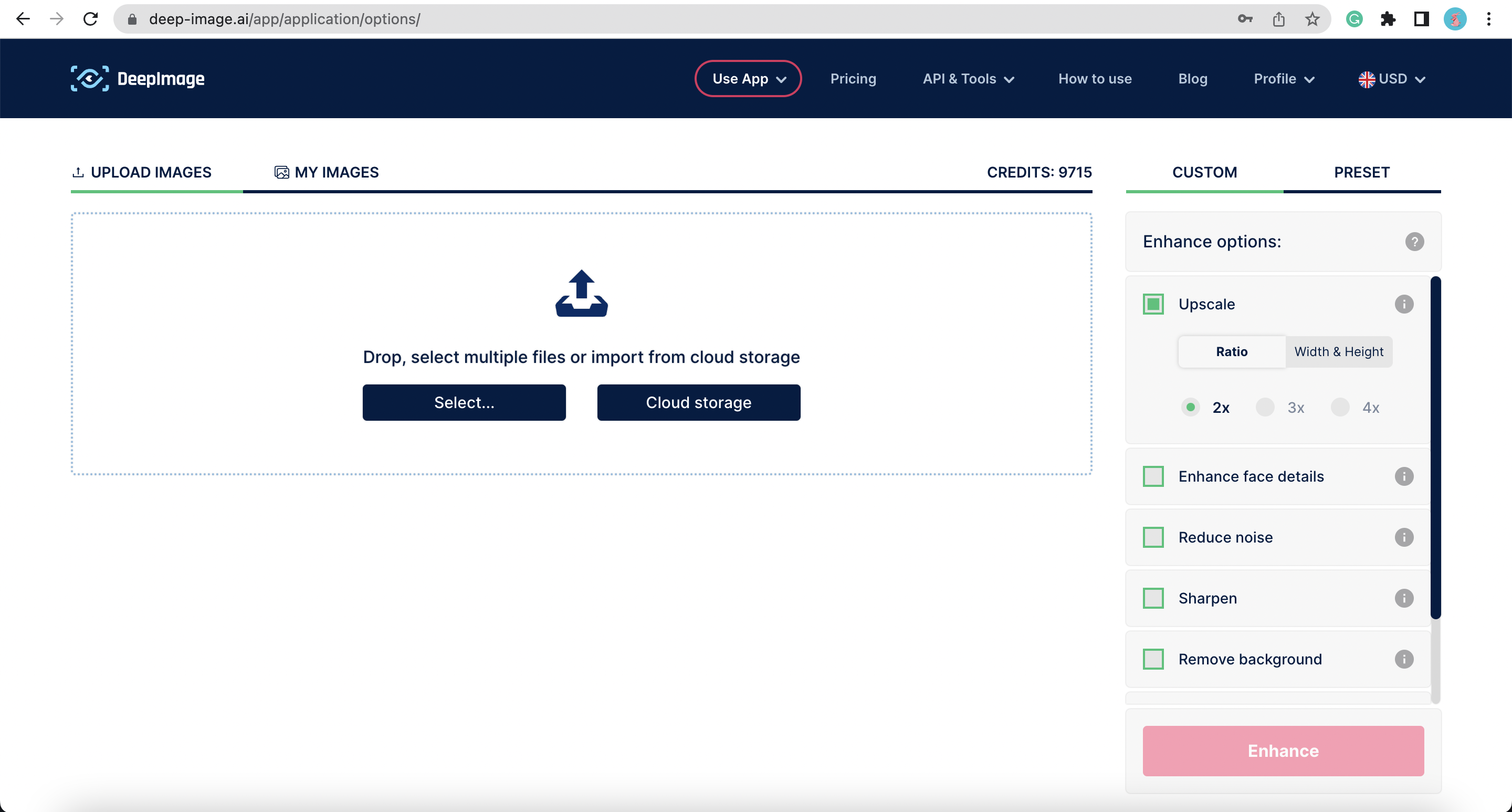
.png?alt=media&token=a0f67470-d88b-4b5c-a61d-236ef12f78fd)
.png?alt=media&token=64d72095-9f76-4484-9ab9-a2b6c34a8748)
.png?alt=media&token=d652771b-5de7-49b9-af94-34c73293eee6)
.png?alt=media&token=38a60829-a3aa-4f0a-b708-f7dbd99ea4bd)


.png?alt=media&token=e4c2ffd0-0a32-43d3-8a17-a5f538b43afc)
.png?alt=media&token=4b3f6f42-b519-44ba-8589-26f4df47d00c)
.png?alt=media&token=a2a2e709-1172-44c0-9f95-11fab65e45da)
.png?alt=media&token=5b8f2156-a788-41a6-bbc0-09cddfff06cc)
.jpg?alt=media&token=a22716c3-41ae-4037-83fb-ab82954c5b48)


.png?alt=media&token=82fb1076-4f0c-4f01-95d1-0cd854419d25)

.png?alt=media&token=5c559628-4541-4115-9bf7-a8c0e5bb4e9e)

.png?alt=media&token=6934191d-75cc-4f00-a244-11ba8703c7c2)
.jpg?alt=media&token=3203aa65-73a9-4c9b-bf01-75c099653aa7)

